

Create usage plans and request consent
Configure ShareAI application surcharges and usage plans while preserving the customer’s accepted terms and requiring consent for increases.
On this page
Usage-based monetization defines the surcharge offered to customers using your application through their ShareAI account. It belongs to an accepted application agreement; changing a draft setting does not rewrite an existing customer’s consent.
Complete monetization setup#
- Open the application’s business and monetization setup.
- Describe the pricing model, delivery setup and API-expense arrangements requested by Console.
- Set Your surcharge and inspect the calculator as an estimate.
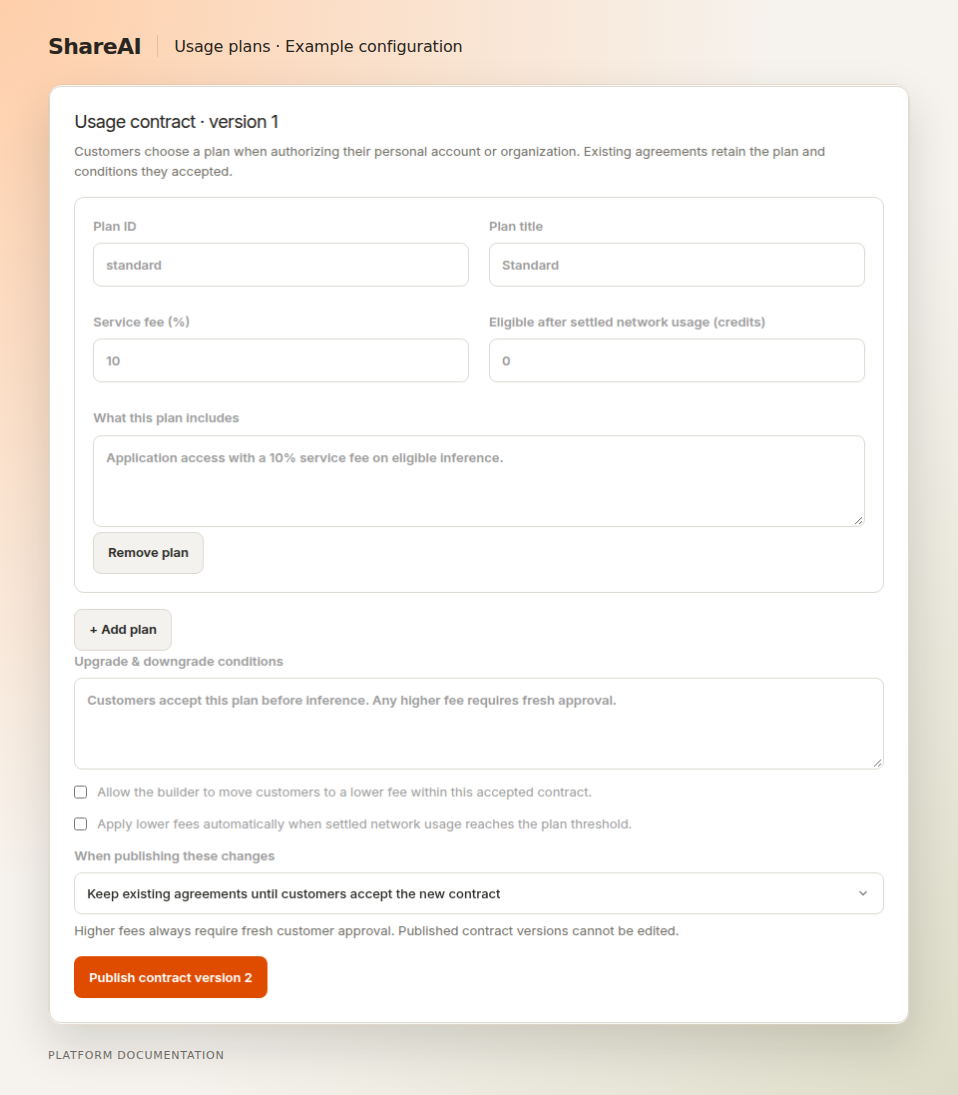
- Create the supported usage plans and describe any permitted transitions.
- Publish the plan version using the transition behavior offered by Console.
Explain the price clearly#
A plan should state the surcharge and when a lower plan can apply. Calculator amounts are estimates of potential surcharge earnings, not guaranteed revenue. Keep the customer’s total and the network usage component understandable.
Existing customers keep accepted terms#
A higher fee requires a new interactive authorization. Depending on the selected publication behavior, existing grants can retain their prior contract or be required to reauthorize. Do not assume a new plan silently updates every customer.
Lower plans#
Manual or usage-triggered decreases are available only when allowed by the originally accepted contract. Automatic decreases depend on eligible settled usage. A request already admitted retains the contract and fee it started with.
Backend integration#
Agreement API documents subject ownership, grant IDs, revision checks and idempotency for permitted changes.
Last updated September 15, 2026